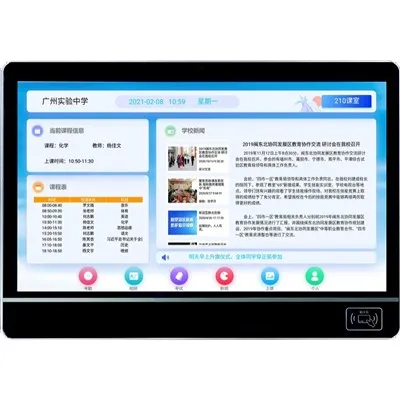
Hey there! As a supplier of School Digital Bulletin Boards, I've seen firsthand how crucial these boards are for schools. They're not just a fancy way to display information; they're a vital communication tool that keeps students, teachers, and parents in the loop. But what happens when things go wrong? That's where backup and recovery options come in. In this blog, I'll walk you through the different ways you can safeguard your school's digital bulletin board data and get it up and running again if something goes haywire.
Why Backup and Recovery Matter
Let's face it, technology isn't perfect. Hard drives can fail, software can glitch, and sometimes, there are just unexpected disasters like power outages or natural disasters. Without a proper backup and recovery plan, all the important announcements, schedules, and other information on your digital bulletin board could be lost forever. That's a huge problem, especially when it comes to keeping everyone informed in a timely manner.
Types of Backup Options
Cloud Backup
One of the most popular backup options these days is cloud backup. With cloud backup, your data is stored on remote servers maintained by a third - party provider. This means you don't have to worry about physical storage devices like external hard drives. The cloud provider takes care of all the maintenance, security, and updates.
The benefits of cloud backup are numerous. First of all, it's incredibly convenient. You can access your backed - up data from anywhere with an internet connection. This is great for schools that may have multiple locations or for administrators who need to access the data on the go. Second, cloud backup is usually very reliable. Reputable cloud providers have redundant systems in place to ensure that your data is always safe. And third, it's scalable. As your school's digital bulletin board grows and your data needs increase, you can easily adjust your cloud storage plan.
To learn more about how cloud - based solutions can enhance your school's digital signage, check out Digital Signage for Schools.
External Hard Drive Backup
Another tried - and - true backup option is using an external hard drive. This is a physical device that you can connect to your computer or server to store your data. External hard drives are relatively inexpensive and easy to use. You can schedule regular backups to ensure that your data is always up - to - date.
However, there are some drawbacks to using external hard drives. They can be easily lost, stolen, or damaged. And if you rely solely on an external hard drive for backup, you're at risk of losing all your data if something happens to the drive. It's also important to note that external hard drives need to be maintained and updated regularly to ensure optimal performance.
Tape Backup
Tape backup is an older technology, but it still has its place in the world of data backup. Tapes can store large amounts of data and are relatively inexpensive. They're also very durable and can last for a long time if stored properly.
But tape backup has some limitations. It's slower than other backup methods, and retrieving data from tapes can be a time - consuming process. Also, tape drives and tapes require special handling and storage conditions to prevent damage.
Recovery Options
Full System Recovery
In the event of a major disaster, such as a complete system failure, a full system recovery may be necessary. This involves restoring your entire digital bulletin board system, including the operating system, software, and all your data. With a full system recovery, you can get your digital bulletin board up and running as if nothing had happened.
Full system recovery can be done using either your cloud backup or your external hard drive backup. If you're using cloud backup, the recovery process is usually automated and can be completed relatively quickly. If you're using an external hard drive, you'll need to manually install the operating system and restore your data.
File - Level Recovery
Sometimes, you may only need to recover a single file or a small group of files. This is where file - level recovery comes in. File - level recovery allows you to restore individual files without having to restore the entire system. This is useful if you accidentally delete a file or if a file becomes corrupted.
Most backup solutions, whether cloud - based or external hard drive - based, support file - level recovery. It's a quick and easy way to get back the data you need without having to go through a full system recovery.
Testing Your Backup and Recovery Plan
Having a backup and recovery plan is great, but it's not worth much if you don't test it regularly. You should perform regular tests to make sure that your backups are working properly and that you can recover your data when needed.
Testing your backup and recovery plan can be as simple as restoring a small file or performing a full system recovery in a test environment. By testing your plan, you can identify any issues or weaknesses and make the necessary adjustments.
Choosing the Right Backup and Recovery Solution for Your School
When it comes to choosing the right backup and recovery solution for your school, there are several factors to consider. First, you need to think about your budget. Cloud backup can be more expensive than external hard drive backup, but it offers more features and convenience.
Next, you need to consider your data storage needs. If your school has a large amount of data, you may need a more scalable solution like cloud backup. If you have limited data, an external hard drive may be sufficient.
You also need to think about your technical capabilities. If your school has a dedicated IT staff, they may be able to manage a more complex backup and recovery solution. If not, you may want to choose a solution that is easy to use and requires minimal technical knowledge.


To explore more school signage solutions that can integrate well with your backup and recovery plan, visit School Signage Solutions.
Conclusion
In conclusion, having a solid backup and recovery plan is essential for any school's digital bulletin board. Whether you choose cloud backup, external hard drive backup, or tape backup, the important thing is that you have a way to protect your data and get your digital bulletin board back up and running in case of an emergency.
If you're interested in learning more about our School Digital Bulletin Boards and how we can help you implement a reliable backup and recovery plan, don't hesitate to reach out. We're here to help you make the most of your school's digital signage. And for more information on classroom - specific information display solutions, check out Classroom Information Display.
References
- "Data Backup and Recovery Best Practices", IT Industry Reports
- "Cloud Computing for Educational Institutions", Educational Technology Journal
- "Digital Signage in Schools: Trends and Challenges", School Administration Magazine