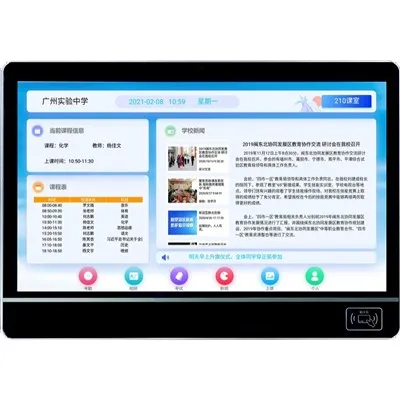
Sharing content in a virtual classroom has become a crucial aspect of modern education. As a supplier of Virtual Classroom Displays, I've seen firsthand the challenges and opportunities that come with this process. In this blog, I'll share some tips on how to effectively share content on a virtual classroom display, drawing from my experience in the industry.
Understanding the Basics of Virtual Classroom Displays
Before we dive into the sharing process, it's important to understand what a virtual classroom display is. These displays are essentially high - tech tools that allow teachers and students to interact in a digital environment. They can range from simple LED screens to more complex digital signage systems. For example, our LED Classroom Display offers a high - resolution viewing experience, making it perfect for sharing various types of content.
Types of Content to Share
There's a wide variety of content that can be shared in a virtual classroom. It could be educational videos, PowerPoint presentations, PDFs, or even live demonstrations. When deciding what to share, consider the learning objectives of your lesson. For instance, if you're teaching a science class, a live demonstration of a chemical reaction can be more engaging than just showing a static image.
Preparing Your Content
Once you've decided on the content, the next step is to prepare it for sharing. Make sure that all your files are in a compatible format. Most virtual classroom displays support common formats like MP4 for videos and PDF for documents. If you're using a PowerPoint presentation, check for any animations or hyperlinks that might not work properly on the display. It's also a good idea to test your content on a similar display before the actual class to avoid any last - minute glitches.


Connecting Your Device to the Virtual Classroom Display
There are several ways to connect your device to the virtual classroom display. The most common method is using an HDMI cable. This provides a high - quality video and audio connection. Some modern displays also support wireless connectivity options like Wi - Fi or Bluetooth. If you're using a wireless connection, make sure your device is connected to the same network as the display. For example, our Classroom Digital Signage System offers seamless wireless connectivity, allowing you to share content with just a few clicks.
Sharing Content during the Class
When it's time to share content, keep it simple and organized. Start by introducing the content and explaining its relevance to the lesson. If you're sharing a video, pause it at key moments to ask questions or encourage discussion. For presentations, use the presenter view on your device to keep track of your notes while the main slides are shown on the display.
Using Interactive Features
Many virtual classroom displays come with interactive features that can enhance the learning experience. For example, some displays support touch - screen functionality, allowing students to interact directly with the content. You can use this feature for activities like quizzes or group discussions. Our Digital Signage for Education is designed with these interactive features in mind, making it easier for teachers and students to engage with the content.
Troubleshooting Common Issues
Even with the best preparation, issues can still arise during content sharing. If you're experiencing a poor connection, check your cables or try restarting your device and the display. If the content isn't displaying correctly, make sure the display settings are configured properly. It's also a good idea to have a backup plan, such as having a printed version of your presentation or a link to an online version of your video.
Engaging Students with Shared Content
Sharing content isn't just about showing information; it's about engaging students. Encourage students to ask questions, make comments, and share their own ideas related to the content. You can also use breakout rooms or group activities to allow students to discuss the content in more detail. For example, after sharing a video on a historical event, you can divide students into groups and ask them to discuss the significance of the event.
Evaluating the Effectiveness of Content Sharing
After the class, take some time to evaluate how effective your content sharing was. Ask students for feedback on the content and the sharing process. You can also look at student participation and engagement levels during the class. Use this feedback to improve your content sharing in future classes.
Conclusion
Sharing content on a virtual classroom display can be a powerful tool for enhancing the learning experience. By understanding the basics of virtual classroom displays, preparing your content, and using interactive features, you can create a more engaging and effective learning environment. If you're interested in purchasing a high - quality virtual classroom display for your educational institution, we're here to help. Our products are designed to meet the diverse needs of modern education, offering reliable performance and innovative features. Whether you're a small school or a large university, we can provide you with the right solution. Contact us to start a discussion about your requirements and explore how our products can transform your virtual classroom.
References
- Industry reports on virtual classroom technology
- Educational research on effective content sharing in digital learning environments