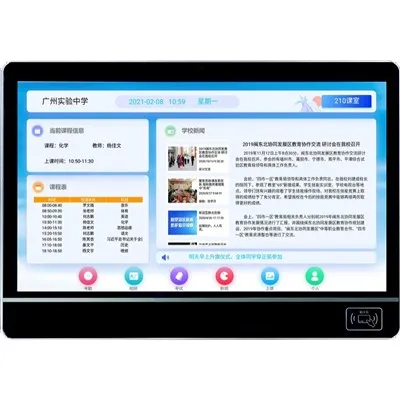
Embarking on the journey of setting up a school display screen system for the first time can seem like a daunting task. As a seasoned supplier of School Display Screen Systems, I've witnessed firsthand the transformative impact these systems can have on educational institutions. In this blog, I'll guide you through the essential steps to ensure a successful installation and implementation of your school's display screen system.
Step 1: Needs Assessment
Before diving into the setup process, it's crucial to conduct a thorough needs assessment. This involves understanding the specific requirements of your school, such as the size of classrooms, the number of display screens needed, and the intended use of the system. Consider factors like the types of content you'll be displaying, whether it's educational materials, announcements, or multimedia presentations.
For instance, if your school has a large auditorium, you may need a high-resolution, large-format display screen to ensure clear visibility from all seats. On the other hand, smaller classrooms may require more compact displays. Additionally, think about the connectivity options you'll need, such as Wi-Fi, HDMI, or Ethernet, to ensure seamless integration with other devices.
Step 2: Choose the Right Display Screens
Once you've identified your school's needs, it's time to choose the right display screens. There are several types of display screens available in the market, each with its own advantages and disadvantages.
- Virtual Classroom Display: Ideal for remote learning and virtual classrooms, Virtual Classroom Display offers high-definition video quality and interactive features. These displays are designed to enhance student engagement and collaboration, even when students are not physically present in the classroom.
- Classroom Digital Signage System: A Classroom Digital Signage System is a versatile solution that allows you to display a variety of content, including announcements, schedules, and educational materials. These systems can be easily customized to meet the specific needs of your school and can be controlled remotely from a central location.
- LED Classroom Display: LED Classroom Display provides bright, vibrant visuals and excellent energy efficiency. These displays are suitable for both indoor and outdoor use and can be used to display a wide range of content, from educational videos to live feeds.
When choosing display screens, consider factors like resolution, brightness, contrast ratio, and viewing angle. It's also important to choose screens that are durable and easy to maintain, as they will be used frequently in a school environment.
Step 3: Plan the Installation
Once you've chosen the right display screens, it's time to plan the installation process. This involves determining the best locations for the screens, ensuring proper wiring and connectivity, and testing the system before it goes live.
- Location Planning: Consider the layout of your classrooms and other areas where the display screens will be installed. Choose locations that are easily visible to students and staff and that do not interfere with other activities in the room. You may also need to consider factors like lighting, ventilation, and access to power outlets.
- Wiring and Connectivity: Ensure that the display screens are properly wired and connected to the necessary devices, such as computers, media players, and network switches. Use high-quality cables and connectors to ensure reliable performance and minimize the risk of signal interference.
- Testing and Calibration: Before the system goes live, it's important to test and calibrate the display screens to ensure optimal performance. This involves adjusting the brightness, contrast, color settings, and other parameters to ensure that the screens display clear, sharp images and videos.
Step 4: Content Management
Once the display screen system is installed and tested, it's time to start managing the content. This involves creating and uploading content to the system, scheduling the display of content, and monitoring the performance of the system.
- Content Creation: Create engaging and relevant content that is tailored to the needs of your school and your students. This may include educational videos, presentations, announcements, and other types of media. You can use a variety of tools and software to create content, such as video editing software, presentation software, and graphic design tools.
- Content Uploading: Once you've created the content, upload it to the display screen system using a content management system (CMS). A CMS allows you to easily manage and schedule the display of content across multiple screens. You can also use the CMS to monitor the performance of the system and make any necessary adjustments.
- Scheduling and Monitoring: Schedule the display of content based on the needs of your school and your students. You can schedule content to be displayed at specific times, on specific days, or in specific locations. You can also monitor the performance of the system using the CMS to ensure that the content is being displayed correctly and that the system is running smoothly.
Step 5: Training and Support
Finally, it's important to provide training and support to your staff and students to ensure that they can use the display screen system effectively. This involves providing training on how to create and manage content, how to operate the system, and how to troubleshoot any issues that may arise.


- Training: Provide training to your staff and students on how to use the display screen system. This may include training on how to create and manage content, how to operate the system, and how to troubleshoot any issues that may arise. You can provide training in-person or online, depending on the needs of your school and your staff.
- Support: Provide ongoing support to your staff and students to ensure that they can use the display screen system effectively. This may include providing technical support, answering questions, and providing updates and upgrades to the system as needed. You can provide support through a help desk, email, or phone.
Conclusion
Setting up a school display screen system for the first time can be a complex and challenging process, but it doesn't have to be. By following these steps and working with a trusted supplier, you can ensure a successful installation and implementation of your school's display screen system.
If you're interested in learning more about our School Display Screen Systems or if you have any questions or concerns, please don't hesitate to contact us. We'd be happy to help you find the right solution for your school and to provide you with the support and training you need to ensure a successful implementation.
References
- Educational Technology Research and Development. (2023). Best Practices for Implementing Digital Signage in Schools.
- International Journal of Educational Technology in Higher Education. (2023). The Impact of Display Screen Systems on Student Engagement and Learning Outcomes.
- Journal of Educational Computing Research. (2023). Designing and Evaluating Classroom Display Screen Systems for Effective Teaching and Learning.