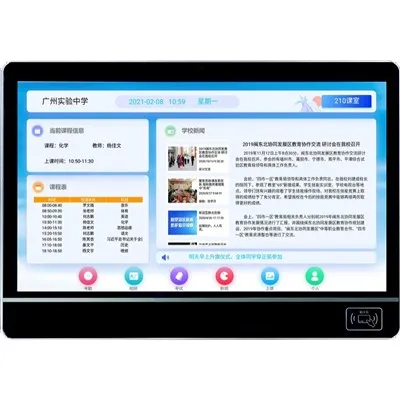
Managing user accounts on an LED classroom display might seem like a daunting task, but it's actually pretty straightforward once you get the hang of it. As a supplier of LED Classroom Display, I've seen firsthand how important it is to have a well - managed user account system.
Why User Account Management Matters
First off, let's talk about why managing user accounts on an LED classroom display is so crucial. In a classroom setting, different people have different needs. Teachers need access to all the features to conduct lessons, while students might only need limited access for viewing content. Having separate user accounts ensures that each user can access only what they're supposed to.
For example, teachers can create and manage lesson plans, schedule announcements, and control the display settings. If students had unrestricted access, they could accidentally or intentionally mess up these important configurations. By managing user accounts, we can maintain the integrity of the classroom environment and keep things running smoothly.
Setting Up User Accounts
The first step in managing user accounts is setting them up. When you purchase our LED Classroom Display, we'll provide you with a simple setup process. You can start by creating a master account for the school administrator. This account has full control over all the features and can create, edit, and delete other user accounts.
To create a new user account, log in to the administrator account and navigate to the user management section. Here, you'll be able to add new users by entering their basic information such as name, email, and a unique username. You can also assign a role to each user, like teacher, student, or guest.
Defining User Roles
As I mentioned earlier, different roles have different levels of access. Teachers, for instance, should have access to features like uploading teaching materials, controlling the display's input sources, and scheduling content. They can use the Classroom Digital Signage System to share important announcements and educational resources with students.


Students, on the other hand, should have a more restricted set of permissions. They can view the content that teachers have shared, participate in interactive activities if enabled, but they shouldn't be able to make any major changes to the display settings.
Guest accounts are useful for visitors or substitute teachers. They can have limited access, usually just for viewing the current content on the display.
Password Management
Passwords are a key part of user account security. As an administrator, you can set up password policies to ensure that users have strong passwords. For example, you can require passwords to be a certain length, include a mix of letters, numbers, and special characters.
It's also a good idea to enable password reset options. If a user forgets their password, they can easily reset it using their registered email address. This helps to minimize downtime and keep the classroom activities running without any major disruptions.
Account Monitoring and Auditing
Once the user accounts are set up, it's important to monitor and audit them regularly. You can check who is logging in, what actions they're performing, and when they're doing it. This can help you detect any unauthorized access or suspicious behavior.
For example, if a student account is trying to access administrative features, you can quickly identify it and take appropriate action. You can also use the audit logs to track the usage patterns of different users and make adjustments to the account settings if necessary.
Integrating with Other Systems
Our LED Classroom Display can be integrated with other school systems, such as the student information system (SIS) or the learning management system (LMS). This integration can simplify the user account management process.
For example, when a new student enrolls in the school, their information can be automatically synced with the display's user account system. This eliminates the need for manual data entry and reduces the chances of errors.
Training Users
Even with a well - designed user account management system, users need to be trained on how to use it. Provide training sessions for teachers and students so that they understand how to log in, access the features they need, and follow the security protocols.
You can create user guides or video tutorials that are easy to understand. Make sure to cover topics like password management, accessing different types of content, and reporting any issues they might encounter.
Troubleshooting Common Issues
Sometimes, users might face issues with their accounts. For example, they might have trouble logging in, or they might not be able to access certain features. As a supplier, we offer technical support to help you resolve these issues quickly.
If a user is having trouble logging in, it could be due to a password issue or a problem with the account settings. Our support team can guide you through the steps to reset the password or check the account permissions.
Updating User Accounts
As the school year progresses, there will be changes in the user population. New students will enroll, and some students will graduate. Teachers might change their roles or leave the school. It's important to keep the user accounts up - to - date.
You can easily update user accounts by logging in to the administrator account and making the necessary changes. Delete accounts of students who have graduated or teachers who have left, and add new accounts for incoming students and staff.
The Future of User Account Management on LED Classroom Displays
The technology behind LED classroom displays is constantly evolving, and so is the user account management system. In the future, we can expect more advanced features like biometric authentication, which can provide an extra layer of security.
We might also see better integration with virtual reality and augmented reality technologies. With the Virtual Classroom Display, user account management will need to adapt to support these new and immersive learning experiences.
Conclusion
Managing user accounts on an LED classroom display is an important part of creating a secure and efficient learning environment. By following the steps I've outlined above, you can ensure that each user has the right level of access, the accounts are secure, and the display is used effectively for educational purposes.
If you're interested in learning more about our LED Classroom Display and how we can help you manage user accounts, feel free to reach out to us. We're always ready to assist you with your classroom technology needs and discuss a purchase that suits your requirements.
References
- General knowledge of classroom technology and user account management
- Industry best practices for digital signage and display systems