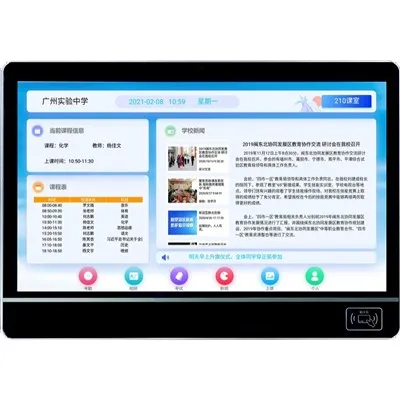
In today's digital age, school digital bulletin boards have become an essential tool for communication and information dissemination within educational institutions. As a leading supplier of [School Digital Bulletin Board], I understand the importance of creating a user-friendly experience for both students and school staff. A well-designed digital bulletin board can enhance engagement, streamline communication, and contribute to a more efficient and informed school environment. In this blog post, I will share some key strategies on how to make a school digital bulletin board more user-friendly.
1. Understand Your Audience
The first step in creating a user-friendly digital bulletin board is to understand the needs and preferences of your audience. Students, teachers, administrators, and parents all have different information requirements and usage patterns. For example, students may be more interested in event announcements, club activities, and academic resources, while teachers may need access to professional development opportunities, class schedules, and teaching materials. By conducting surveys or focus groups, you can gather valuable insights into what information is most important to each user group and how they prefer to access it.
2. Simplify the Design
A cluttered and complex design can make it difficult for users to find the information they need. To create a more user-friendly experience, keep the design of your digital bulletin board simple and intuitive. Use clear headings, subheadings, and categories to organize the content, and make sure that important information is prominently displayed. Avoid using too many colors, fonts, or graphics, as these can be distracting and make the board look unprofessional. Additionally, consider using a responsive design that adapts to different screen sizes, so that users can access the bulletin board from their smartphones, tablets, or computers.
3. Provide Clear Navigation
Navigation is key to a user-friendly digital bulletin board. Make sure that users can easily find their way around the board by providing clear navigation menus and search functions. The navigation menu should be located in a prominent position on the screen and include links to all the major sections of the board. The search function should be easy to use and allow users to search for specific keywords or topics. You may also want to consider adding breadcrumbs to the board, which show users their current location within the site and make it easier for them to backtrack if they get lost.
4. Use Multimedia Content
Multimedia content such as images, videos, and audio can make your digital bulletin board more engaging and interactive. Use high-quality images and videos to illustrate your announcements and make them more visually appealing. You can also use audio to provide additional information or to create a more immersive experience. For example, you could include audio recordings of guest speakers or interviews with students and teachers. However, make sure that the multimedia content is relevant to the information being presented and does not slow down the loading time of the board.
5. Update the Content Regularly
A digital bulletin board that is not regularly updated can quickly become outdated and lose its relevance. To keep users engaged, make sure that the content on your board is fresh and up-to-date. Set a regular schedule for updating the board, and make sure that all announcements and events are accurate and current. You may also want to consider adding a newsfeed or a blog section to the board, where you can post regular updates and articles about school news, events, and activities.
6. Make it Accessible
Accessibility is an important consideration when designing a user-friendly digital bulletin board. Make sure that the board is accessible to all users, including those with disabilities. Use clear and easy-to-read fonts, and provide alternative text for images and videos to make them accessible to users who are visually impaired. You may also want to consider adding closed captioning to your videos and providing audio descriptions for your images. Additionally, make sure that the board is compatible with assistive technologies such as screen readers and magnifiers.
7. Encourage User Interaction
A user-friendly digital bulletin board should encourage user interaction. Provide opportunities for users to comment on announcements, share their thoughts and ideas, and ask questions. You can do this by adding a comment section to each announcement or by creating a dedicated forum or discussion board. You may also want to consider adding a social media integration to the board, so that users can share announcements on their social media profiles and engage with the school community outside of the board.
8. Provide Training and Support
Even the most user-friendly digital bulletin board may require some training and support for users. Provide training sessions or tutorials for students, teachers, and administrators on how to use the board effectively. Make sure that users know how to post announcements, search for information, and interact with other users. You may also want to provide a help desk or support email address where users can get assistance if they have any questions or problems.
9. Monitor and Evaluate the Performance
Finally, it is important to monitor and evaluate the performance of your digital bulletin board on a regular basis. Use analytics tools to track the number of visitors to the board, the pages they visit, and the actions they take. This will help you to identify areas where the board can be improved and to make data-driven decisions about future updates and enhancements. You may also want to solicit feedback from users on a regular basis to get their opinions on the board's usability and functionality.


In conclusion, creating a user-friendly school digital bulletin board requires a combination of design, content, and user experience. By understanding your audience, simplifying the design, providing clear navigation, using multimedia content, updating the content regularly, making it accessible, encouraging user interaction, providing training and support, and monitoring and evaluating the performance, you can create a digital bulletin board that is engaging, informative, and easy to use. As a supplier of [School Digital Bulletin Board], we are committed to helping schools create the best possible digital bulletin board experience for their users. If you are interested in learning more about our products and services, please visit our website at Digital Signage for Schools or Classroom Digital Signage or Digital Classroom Displays. We would be happy to discuss your specific needs and requirements and to provide you with a customized solution that meets your budget and goals.
References
- Nielsen, J. (1993). Usability Engineering. Morgan Kaufmann.
- Norman, D. A. (2013). The Design of Everyday Things. Basic Books.
- Krug, S. (2005). Don't Make Me Think: A Common Sense Approach to Web Usability. New Riders.