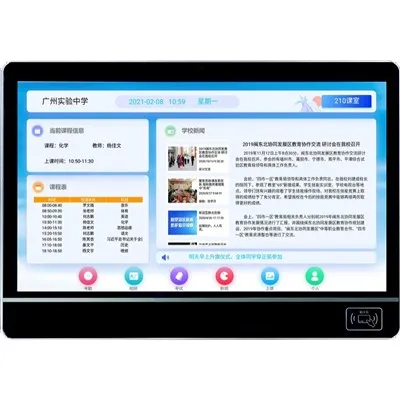
Hey there! I'm a supplier of Interactive School Boards, and today I wanna chat about how these cool devices store data. Interactive school boards have become a staple in modern classrooms, offering a dynamic and engaging way for teachers to present lessons and for students to interact with the learning material. But have you ever wondered how all that data gets stored? Let's dive in!
Types of Data Stored on Interactive School Boards
First off, we need to understand what kind of data these boards handle. There are several types:
- Lesson Content: This includes presentations, videos, PDFs, and other educational materials that teachers upload to the board. It could be a history teacher's slideshow on ancient civilizations or a math teacher's step - by - step problem - solving videos.
- Student Interactions: When students use the board to draw, write notes, or participate in quizzes, that data is also stored. For example, a science class where students draw diagrams of the solar system on the board, and those drawings are saved for later review.
- System Settings: Information about the board's configuration, such as display settings, input preferences, and network connections, is stored. This ensures that the board functions properly and is personalized to the school's needs.
Storage Methods
Internal Storage
Most interactive school boards come with built - in internal storage. It's like the hard drive in your computer. This storage is used to store system files, pre - installed applications, and some user - generated content. The capacity of internal storage can vary widely, from a few gigabytes to several terabytes, depending on the model of the board.
The advantage of internal storage is its speed. Data can be accessed quickly, which is crucial for real - time interactions in the classroom. For example, when a teacher wants to quickly pull up a previously saved lesson, the internal storage allows for fast retrieval. However, the downside is that the capacity is limited. As more and more data is stored, there might not be enough space for new content.
External Storage
To overcome the limitations of internal storage, many schools use external storage devices. USB flash drives are a popular choice. Teachers can easily transfer data between their computers and the interactive school board using a USB drive. It's a convenient way to bring in new lesson materials or back up important student work.
Another option is an external hard drive. These can have much larger capacities than USB flash drives, making them suitable for storing large amounts of data, such as high - definition videos or extensive archives of student projects. External hard drives can be connected to the board via USB or other interfaces.
External storage offers flexibility. Teachers can take their data with them and use it on different boards if needed. But it also has its drawbacks. There's a risk of losing or damaging the external storage device, which could result in data loss.
Cloud Storage
Cloud storage has revolutionized the way we store data, and interactive school boards are no exception. Cloud storage providers offer large amounts of space that can be accessed from anywhere with an internet connection.
Schools can use cloud storage to store all types of data related to the interactive school boards. Teachers can upload lesson plans, students can save their work to the cloud, and administrators can manage system settings remotely. For example, a school district might use a cloud - based system to store all the lesson materials for all its schools, making it easy for teachers to access and share resources.
The benefits of cloud storage are numerous. It provides virtually unlimited storage space, automatic backups, and easy collaboration. Teachers from different schools can share their best - practices and lesson plans stored in the cloud. However, the reliance on an internet connection is a major drawback. If the internet goes down, accessing the data can be impossible.
Data Security
Data security is a top concern when it comes to storing data on interactive school boards. After all, the data contains sensitive information about students and educational content.
Encryption
Most modern interactive school boards use encryption to protect data. Encryption is like a secret code that scrambles the data so that it can only be read by authorized users. Whether the data is stored internally, externally, or in the cloud, encryption ensures that it remains secure.
User Authentication
To access the data on the board, users need to authenticate themselves. This can be done through passwords, PINs, or biometric authentication methods like fingerprint scanning. Only authorized teachers, students, and administrators can log in and access the data.
Network Security
When the board is connected to a network, proper network security measures must be in place. Firewalls are used to block unauthorized access from the outside. Schools also need to ensure that their Wi - Fi networks are secure to prevent data breaches.
Integration with Other School Systems
Interactive school boards don't exist in a vacuum. They often need to integrate with other school systems, such as the School Announcement System and the Classroom Information Display.
School Announcement System
The interactive school board can be integrated with the school announcement system. Announcements can be sent directly to the board, ensuring that all students in the classroom are informed. The data related to announcements, such as the text, images, and timestamps, needs to be stored and managed properly. This integration can enhance communication within the school.
Classroom Information Display
Integrating with the classroom information display system allows for the sharing of important information, such as class schedules, student attendance, and upcoming events. The data from these systems can be stored on the interactive school board, providing a centralized location for all classroom - related information.


The Role of School Signage Solutions
School Signage Solutions can also be related to the data storage of interactive school boards. These solutions often involve digital signage around the school, which can be connected to the interactive school board system.
The data for these signs, such as the content of the messages and the display schedules, needs to be stored and coordinated. The interactive school board can serve as a hub for managing this data, ensuring that all the signage in the school is up - to - date and consistent.
Contact for Purchase and Consultation
If you're interested in learning more about our interactive school boards and how they handle data storage, or if you're considering purchasing these boards for your school, we'd love to hear from you. Our team of experts can provide you with detailed information about the different models, storage options, and integration capabilities. Whether you're a small school looking for a basic solution or a large district in need of a comprehensive system, we have the products and services to meet your needs. Don't hesitate to reach out and start a conversation about how we can enhance your school's learning environment.
References
- "Digital Classroom Technology: A Guide for Educators" by John Doe
- "Storage Solutions for Modern Educational Devices" by Jane Smith
- Industry reports from educational technology research firms.