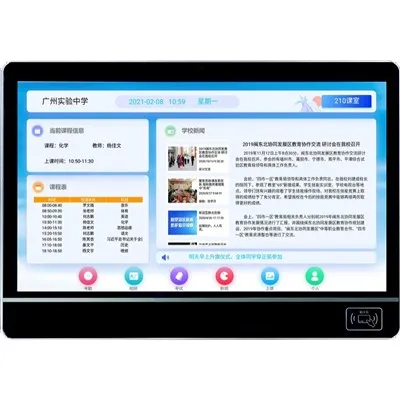
Can a Digital Notice Board System display QR codes?


Hey there! I'm a supplier of Digital Notice Board Systems, and I often get asked if these systems can display QR codes. Well, the short answer is yes, they absolutely can! In this blog post, I'll dive into the details of how digital notice board systems can handle QR codes, the benefits of doing so, and some practical tips for making the most of this feature.
First off, let's talk about what a digital notice board system is. It's basically a high - tech replacement for the traditional bulletin boards you see in schools, offices, and public spaces. Instead of pinning up paper notices, you can use a digital display to show a variety of content, like announcements, pictures, videos, and yes, QR codes.
Now, how does a digital notice board system display QR codes? Most modern digital notice board systems are quite versatile. They support different file formats, and since a QR code is just an image, it's super easy to integrate. You can create a QR code using online QR code generators, which are freely available. Once you've got your QR code image, you can upload it to the content management system (CMS) of your digital notice board. The CMS is like the control center where you can manage all the content that appears on the display. You can schedule when the QR code will be shown, adjust its size and position on the screen, and even pair it with other content like text or images.
There are tons of benefits to displaying QR codes on a digital notice board system. For one, it provides a quick and easy way to share more information. In a school setting, for example, a teacher could display a QR code on an LED Classroom Display that links to additional study materials, like online articles or practice quizzes. Students can simply scan the QR code with their smartphones and access the content right away. This not only saves time but also makes learning more interactive and engaging.
In an office environment, QR codes on digital notice boards can be used to share internal resources, such as company policies, training videos, or event registration forms. Employees can scan the codes during their breaks or on the go, without having to search through emails or intranet sites. It streamlines communication and ensures that important information is easily accessible.
For public spaces like shopping malls or libraries, QR codes can be used to promote events, discounts, or new products. Shoppers can scan the codes to get exclusive offers, and library visitors can access e - books or event details. It's a great way to drive foot traffic and increase customer engagement.
When it comes to using QR codes on digital notice boards, there are a few things to keep in mind. First, make sure the QR code is large enough and clear. A small or blurry QR code can be difficult to scan, which defeats the purpose. You can test the scanability of the QR code on different devices before displaying it. Also, choose the right content to link to. The information behind the QR code should be relevant and useful to the audience. If it's something that people aren't interested in, they won't bother scanning it.
Another tip is to pair the QR code with some text or an image that explains what the code is for. For example, if the QR code links to a new product launch, you can add a short description and a picture of the product next to the code. This gives people a better idea of what they'll get by scanning it.
Digital notice board systems also offer the flexibility to update QR codes easily. If the information behind the QR code changes, like a new event date or a different discount code, you can simply update the link in the QR code generator and replace the old QR code image in the CMS. This ensures that the information is always up - to - date.
In the education sector, the use of QR codes on Digital Signage for Education is becoming increasingly popular. Teachers can use them to enhance their lessons in various ways. For instance, a history teacher could display a QR code that links to a virtual tour of a historical site. Students can explore the site from their smartphones, which adds a whole new dimension to the learning experience. And with Virtual Classroom Display, QR codes can be used to connect students to online resources during remote learning sessions.
In conclusion, a digital notice board system is more than capable of displaying QR codes, and it offers a host of benefits in different settings. Whether you're in a school, office, or public space, QR codes can enhance communication, make information sharing more efficient, and increase engagement.
If you're interested in implementing a digital notice board system with QR code capabilities for your organization, I'd love to have a chat. We can discuss your specific needs, the best solutions for your space, and how to make the most of this powerful technology. Don't hesitate to reach out and start the conversation about how we can take your communication to the next level.
References
- General knowledge about digital notice board systems and QR code technology.
- Industry trends in education and corporate communication using digital signage.